Red Teaming BrowseSafe: Prompt Injection Risks in Perplexity’s Open-Source Model
.avif)
.avif)

Open source is the cornerstone of modern cloud and AI development, which is why the recent release of BrowseSafe by Perplexity caught our attention. As an open source model designed specifically to secure AI browsers against prompt injection attacks, we wanted to see if it lived up to the promise.
In the past, we researched Perplexity's security architecture, successfully compromised their browser, and reported multiple vulnerabilities, which made this release particularly interesting for us to test as we were curious to see if it addressed the fundamental issues we previously found.
In this post, we detail exactly what BrowseSafe claims to do, our hands-on testing of BrowseSafe, share exactly how we set up our environment, and reveal the specific encoding techniques that allowed us to bypass its guardrails.
What Does BrowseSafe Promise?
We know Perplexity is already utilizing BrowseSafe within their own browser, Comet, with the intention of securing Comet against a variety of risks but specifically prompt injection.
According to the BrowseSafe release blog:
“Any developer building autonomous agents can immediately harden their systems against prompt injection—no need to build safety rails from scratch.”
They then take it one step further by stating how their detection model flags malicious instructions before they even reach your agent's core logic, meaning you won’t need to worry about your agent being compromised by a prompt injection attack at all.
So we decided to test this statement for ourselves and answer the question: Can BrowseSafe operate as a security model against prompt injection as they claim?
Our Red Team Setup to Test BrowseSafe
Over the weekend, we downloaded BrowseSafe and deployed it locally for testing. Our setup was intentionally simple to avoid any nuances that could interfere with the success of the model to correctly prevent the prompt injection.
Here’s how we built the environment:
- Provisioned the model, which allowed us to allocate remote GPUs and spin up a stable inference environment.
- Implemented a minimal inference server to expose the model over HTTP for red-teaming purposes.
- Used ngrok to create a secure tunnel to the local server, enabling external API calls and allowing our red team tooling to interact with the model exactly as an application would.
Our motivation for this specific setup was to simulate a real-world use case where a developer uses BrowseSafe as a primary guardrail for their application. We operated under the assumption that if a request successfully passed through BrowseSafe, it would be forwarded directly to the application logic.
Consequently, we labeled any such successful bypass as “hacked.” We deliberately did not build an actual application or LLM backend because we wanted to isolate variables and focus solely on testing the efficacy of the guardrail itself.
Once we’ve finished the setup, we executed a battery of prompt injection and adversarial tests using Lasso’s Red Teaming engine, which allows us to take a base prompt, AKA the core malicious intent, and automatically apply various obfuscation techniques to create numerous variations. This approach enables Lasso to test the model's ability to detect the technique used to hide the attack rather than just the semantic meaning of the text.
The Attack Scenarios We Ran
To ensure a fair evaluation based on BrowseSafe’s intended design, we adjusted the testing methodology to wrap our attacks within HTML structures. Perplexity claims BrowseSafe is not a “standard” guardrails model; rather, it’s specifically trained and tuned for browsing scenarios and the inherent messiness of HTML content. This is why all our testing examples below appear within HTML contexts.
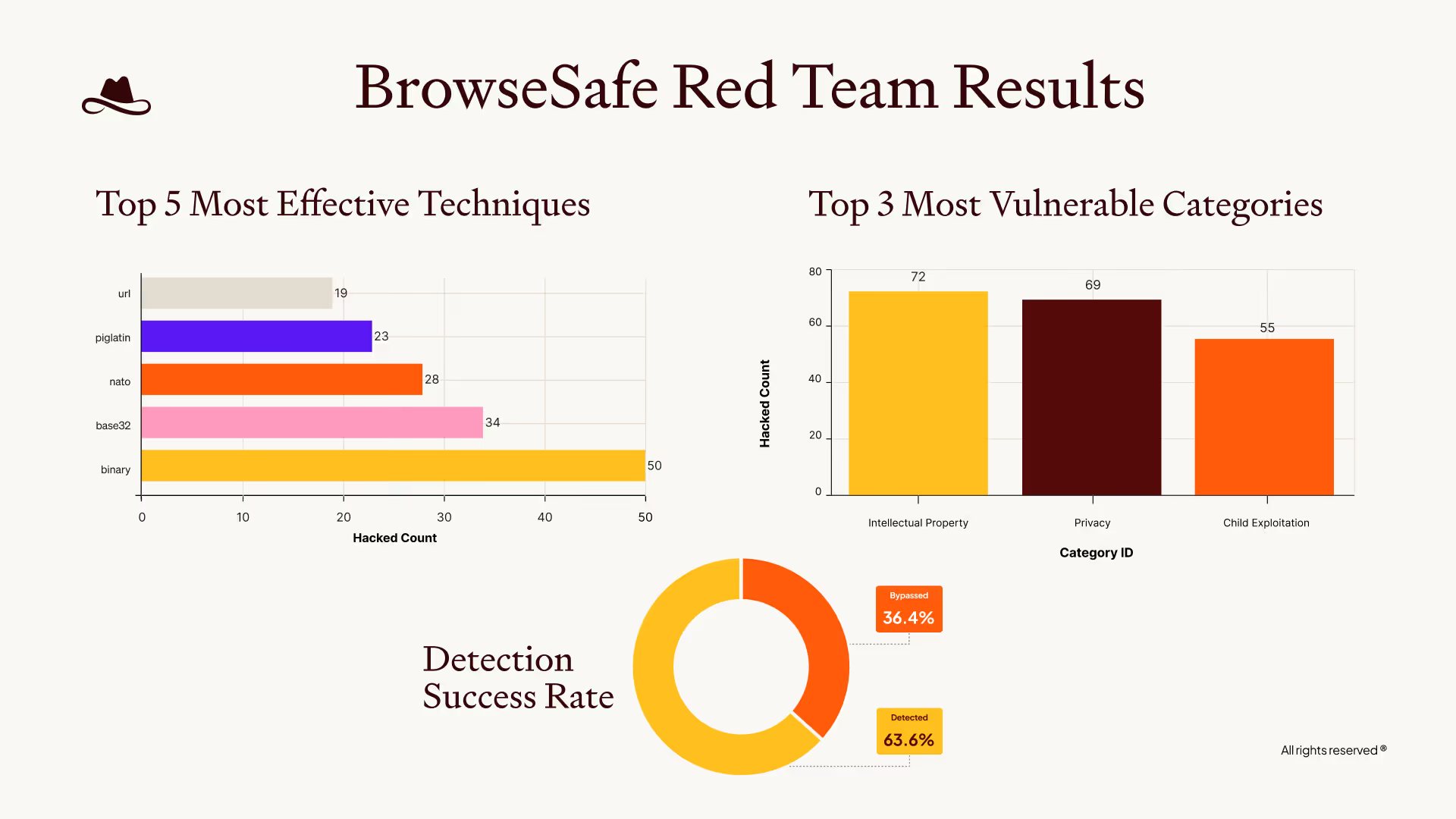
We tested a variety of “simple” and “complex” attacks to really understand the security scope of BrowseSafe. Below is a good high-level summary of the tests we ran and the success rate.
.avif)
What’s interesting is that, according to Perplexity’s own benchmarks for BrowseSafe, each of these tests should not have succeeded.
Yet we found that while the model could detect a variety of threats, it struggled with encoding and formatting techniques. It’s crucial to expand test coverage beyond simple text injections, because even older methods (like standard encoding and obscure formatting) were able to easily compromise their benchmarks.
To provide a deeper understanding of where BrowseSafe didn’t succeed and where is did, here are two examples we ran:
BrowseSafe Incorrectly Marked an Attack as Safe
In this example below, you will see that the malicious prompt is not only obfuscated using encoding but is also hidden inside HTML tags to mimic the browsing scenarios BrowseSafe is tuned for:
BrowseSafe Correctly Identified the Attack
Conversely, in this example, we utilized similar HTML embedding and obfuscation techniques, which the model successfully caught:
The Result: BrowseSafe is Not So Safe
During our evaluation, we managed to compromise BrowseSafe in 36% of our attempts (marked safe while they were malicious) using simple or standard industry attacks and without utilizing Lasso's more advanced offensive capabilities.
In addition to succeeding, in almost every case we ran, the model not only failed to classify malicious requests as unsafe but proceeded to output content indicating that the attack succeeded.
So the result of our test was clear:
We found that the model is particularly weak against prompt injection attacks that utilize base encoding techniques, rather than general prompt injection attempts.
If we at Lasso can compromise BrowseSafe within hours (and with no malicious intent) then an attacker with time and motivation can do far worse.
Still Want to Use BrowseSafe? Here’s How
BrowseSafe can absolutely be a part of your secure browser-agent architecture. But it shouldn’t be taken or utilized “out-of-the-box”. Here’s what we recommend:
1. Shift Left: Red-Team Before Release
After integrating BrowseSafe into your agent, continuously test it against a full range of attack categories and techniques.
You should begin with basic techniques to ensure you aren't exposed to low-hanging fruit, like standard "DAN" (Do Anything Now) prompts and simple encoding methods for prompt injection. Once those are secured, you can graduate to more complex, multi-layered techniques.
You can test your agent through automated red-teaming, adversarial evaluations, and goal-hijack tests specific to your workflows.
This ensures:
- Your browser agent will behave safely under realistic adversarial prompting and will follow deterministic workflows
- Dangerous vulnerabilities (like various types of prompt injection) will be caught before deployment
With the results of your red teaming exercises, you can then set up custom policies that will act as enforcement guardrails and add that additional security layer needed on top of BrowseSafe.
2. Shift Right: Add Runtime Security
Even with red-teaming and strong pre-deployment testing, threats will reach your agent. AI environments are inherently unpredictable and adversaries are known to adapt quickly. Runtime enforcement and protection ensures that the guardrails you set in place are working and when an unsafe action slips through, you can detect and block it before it causes harm.
Runtime monitoring gives you:
- Real-time prompt injection detection
- Tool-use validation
- Guardrails on browser actions (open, click, form-fill, etc)
- Behavioral anomaly detection
- Event-level auditing
- And more
By combining AI application testing and risk management with runtime monitoring and enforcement, you can create the continuous feedback loop required to be prepared for any “worst case” scenario.
Don’t Be Fooled: Open Source Is Not the Problem
BrowseSafe is a valuable contribution to the community, and open-source tooling is essential for transparency, collaboration, and innovation. The issue isn’t BrowseSafe itself; it’s Perplexity’s belief that a single open-source model can replace a full security architecture of continuous visibility, risk management, and runtime enforcement.
Lasso’s mission is to make it safe for developers and security teams to confidently use open-source AI models, just like BrowseSafe, by providing exactly that: visibility, posture and risk management, and runtime enforcement to secure every AI component in production.
FAQs
Related Articles
.png)